
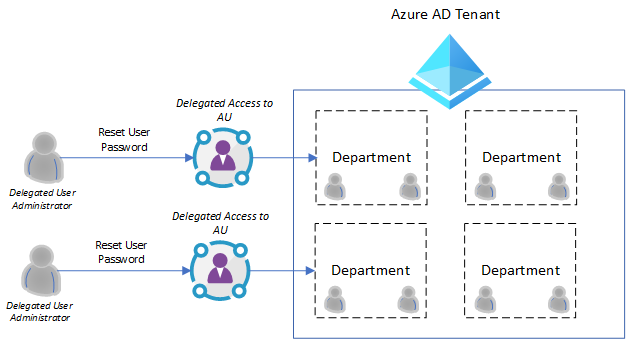
The Administrative Units (AU) are Azure AD resources which can contain only users and groups.
AUs could manage permissions 🛡️🔐 in a role to any segment of your organization. For example, you could use AUs to delegate the User Administrator role to regional support specialists, so they can manage users only in the region that they support.
The AUs are especially helpful when an organization whose IT department is scattered across globe and wants to categorize and define relevant geographical boundaries.
Currently, supported scenarious from Azure AD portal are:
- Create administrative units
- Add users and groups members of administrative units
- Assign IT staff to administrative unit-scoped administrator roles.
In addition, assigned users can easily manage their AU users from mystaff Microsoft website 👉 https://mystaff.microsoft.com/
Check out the following Microsoft docs post for more details and use ases👉 https://lnkd.in/dXMMncJ #SharingIsCaring❤️
Now, if you end up loving this story and want to lean about managing your sers with “My Staff” – then check out this handy post on Micrsoft docs page:
Fᴏʟʟᴏᴡ ᴍᴇ 🎯 ᴀɴᴅ become the #cloudmarathoner ⛅🏃♂️🏃♀️ – 𝐋𝐄𝐓’𝐒 𝐂𝐎𝐍𝐍𝐄𝐂𝐓 👍
